How Rutter Connect works
How it works
This page walks the architecture top to bottom. Read it once before wiring Rutter Connect into a real product so the security review goes faster.
What MCP is
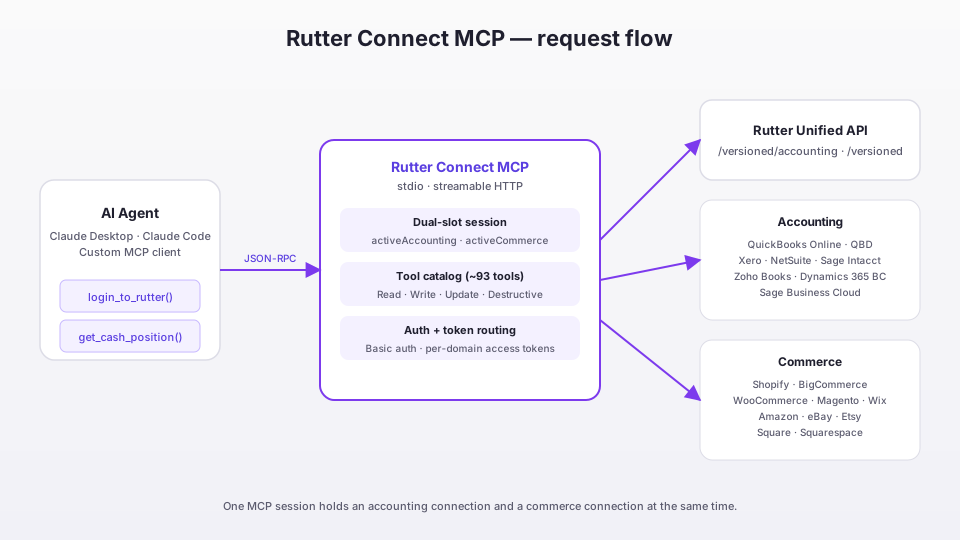
Model Context Protocol is an open spec from Anthropic that lets an LLM call tools on a remote server using a standard JSON-RPC interface. Instead of bolting custom function-calling into every app, the model speaks one protocol and the server advertises its tools, schemas, and results.
A naive MCP server typically has to solve six things:
- Auth — proving the user is who they say they are, and binding the session to the right tenant.
- Tool discovery & schemas — advertising what tools exist and their argument shapes.
- Normalization — when one MCP fronts many backends (e.g. QuickBooks vs. Xero), the model shouldn't see platform quirks.
- Rate limits & abuse — the model can call tools in a loop; the server has to throttle.
- Audit & compliance — someone needs to know what the model did on a user's behalf.
- Write safety — read calls are forgiving; mutations (post a bill, refund an order) are not.
Rutter Connect solves all six.
What Rutter Connect adds
Pre-bound connections — no re-auth in chat
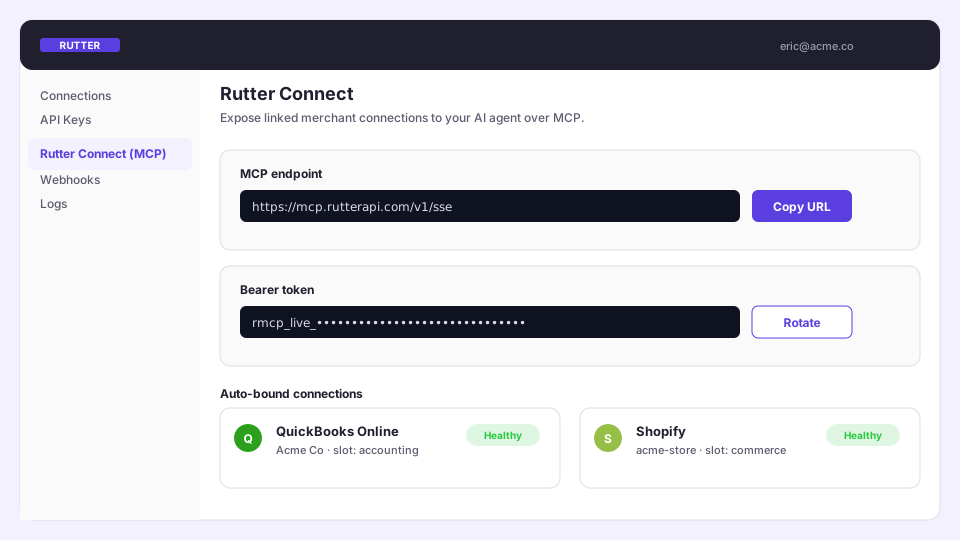
Merchants link their platforms once via Rutter Link in your dashboard. When a chat starts, Rutter Connect silently binds those existing connections into the MCP session, so the agent never has to interrupt the conversation with a Link flow.
Unified schema
A Bill looks the same whether the source is QuickBooks or Xero. A Product looks the same on Shopify or Amazon. Your prompts stay simple. The canonical per-platform support matrix lives at the Coverage Explorer.
Verb-prefixed tool catalog
About 93 tools, grouped by domain:
- Read —
list_*,get_*,search_*across customers, vendors, accounts, items, invoices, bills, journal entries, products, orders, payouts. - Write —
create_*,update_*,delete_*, plusapply_invoice_credit,archive_employee. - Analytics —
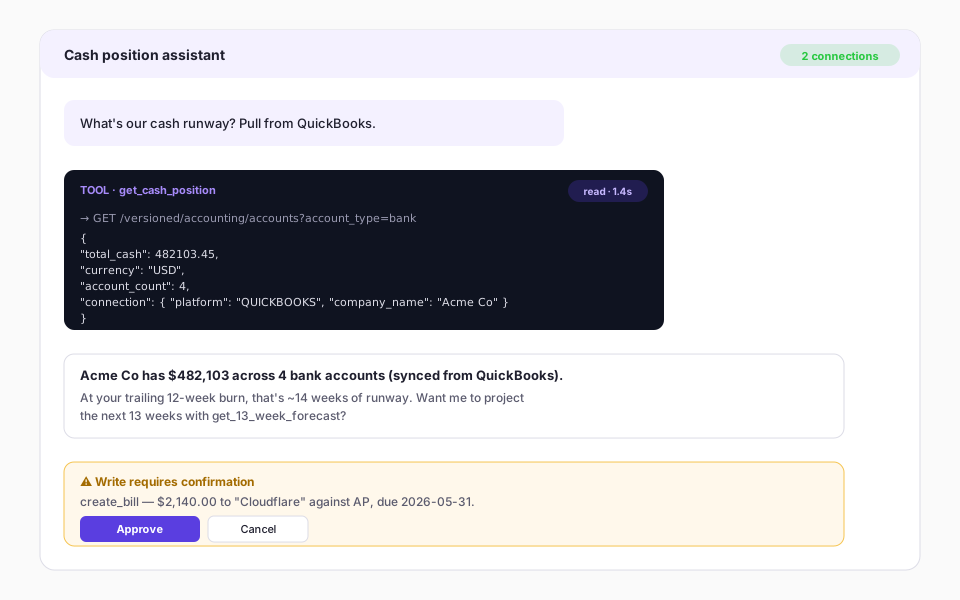
get_cash_position,get_13_week_forecast,get_ar_aging_summary,get_late_payment_prediction,get_ap_optimization,get_financial_action, and a dozen more. - Reports —
get_income_statement,get_revenue(GL-backed, not invoice sums). - Image extraction —
process_financial_image,process_and_create_from_image(drop a receipt or invoice PDF, post it as a bill).
Server roles
rutter-poweruser— the end-user data surface. Accounting + commerce tools, plumbing, analytics. This is what your agents talk to.rutter-sysadmin— the operator surface. Read-onlylist_connectionsandget_connection_healthfor ops dashboards.
Transports
- stdio — for Claude Desktop and any MCP client that spawns a local process.
- Streamable HTTP — for hosted agents and remote clients. Each
initializemints a fresh session pinned to a generated session id; tool handlers run underAsyncLocalStorageso concurrent sessions don't bleed state.
Connection model: dual slots
A single SessionStore holds two independent active connections:
1interface SessionStore {
2  activeAccounting: RutterConnection | null;
3  activeCommerce:   RutterConnection | null;
4  connectionMap:    Map<string, RutterConnection>; // history of every connection bound this session
5}
- Accounting tools resolve tokens from
activeAccounting. - Commerce tools resolve tokens from
activeCommerce. - Re-authing replaces only the slot for that domain — the other slot stays intact.
The login flow:
1login_to_rutter(domain="accounting")  → pick QBO/Xero/NetSuite in Link → fills accounting slot
2login_to_rutter(domain="commerce")    → pick Shopify/Amazon in Link    → fills commerce slot
3get_active_connection                 → inspect both slots
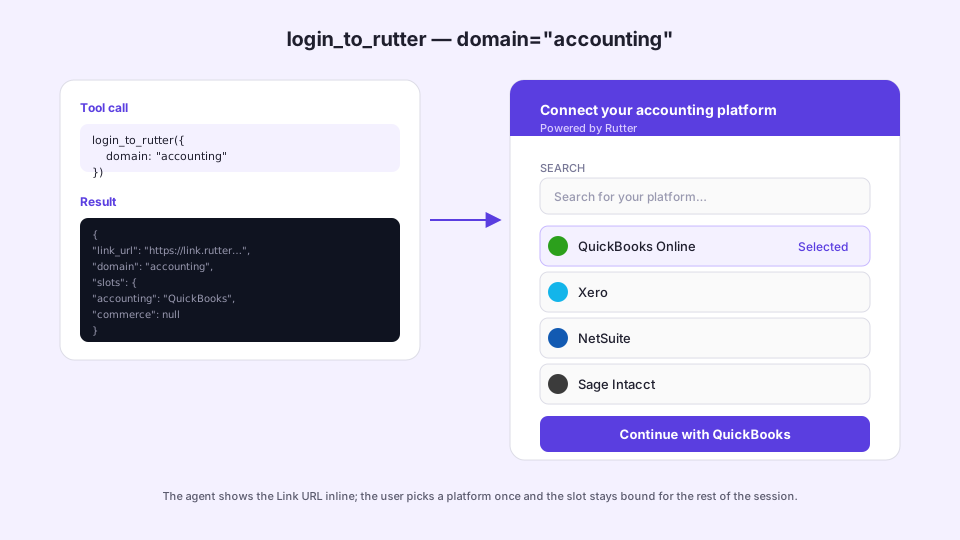
The login_to_rutter response includes:
| Field | Meaning |
|---|---|
domain | Domain of the platform actually picked. |
requested_domain | What the caller asked for (null if unspecified). |
domain_mismatch | Set if the user picked a platform in the other domain. The slot is still filled; the agent should surface the mismatch and offer a retry. |
replaced_previous | True if a prior connection in that slot was replaced. |
slots | { accounting, commerce } snapshot after the bind. |
next_step | Context-aware hint (e.g. suggest connecting the other domain). |
Auth model
Every Rutter call uses HTTP Basic auth (RUTTER_CLIENT_ID:RUTTER_CLIENT_SECRET) plus a per-connection access_token. There is no fallback to a default access token — that prevents cross-tenant leaks. Every response includes a connection { company_name, connection_id, platform } envelope so the agent can attribute results.
Write safety: where the gate sits
Rutter Connect treats reads as forgiving and mutations as not. The gate fires before the call leaves the server:
- MCP annotations — every write tool is tagged
readOnlyHint: false, withdestructiveHint: truefor delete/void. Hosts that honor annotations bucket tools automatically. - Description prefixes —
[Accounting · Write],[Commerce · Delete], etc. for clients that don't. - Confirmation step — the agent summarizes the action ("Post a $2,140 bill to QuickBooks?") and waits for the user to click Approve before the write fires.
- Envelope wrapping — POST/PATCH bodies are wrapped as
{ "<resource>": { ... } }. Flat bodies fail closed with400. - Structured failure — operations Rutter or the platform can't do return
{ "success": false, "error": "operation_not_supported" | "platform_unsupported", "suggestion": "…" }instead of a raw stack trace. - Balanced-entry validation —
create_journal_entryandupdate_journal_entryenforcesum(debits) === sum(credits)client-side before the call leaves the server. - Source URL deep links — for QBO and Xero, write responses include a
source_urlso the user can verify the posted record in the platform UI.
Audit & observability
Every tool call is captured: arguments, result, latency, the merchant it ran for, errors. Read args are stored hashed; write args are stored encrypted with the merchant id as AAD so they're recoverable for incident review. Webhooks fan events out to your own pipeline.
The sysadmin server exposes two read-only tools — list_connections and get_connection_health — that surface this same data to ops dashboards.
What's next
- Quickstart — wire it up against a sandbox merchant.
- Use cases — pick the integration shape that matches your product.