Use cases
Use cases
Three common shapes for using Rutter Connect. Pick the one closest to what you're building before clicking into the Quickstart.
1. Building a finance agent
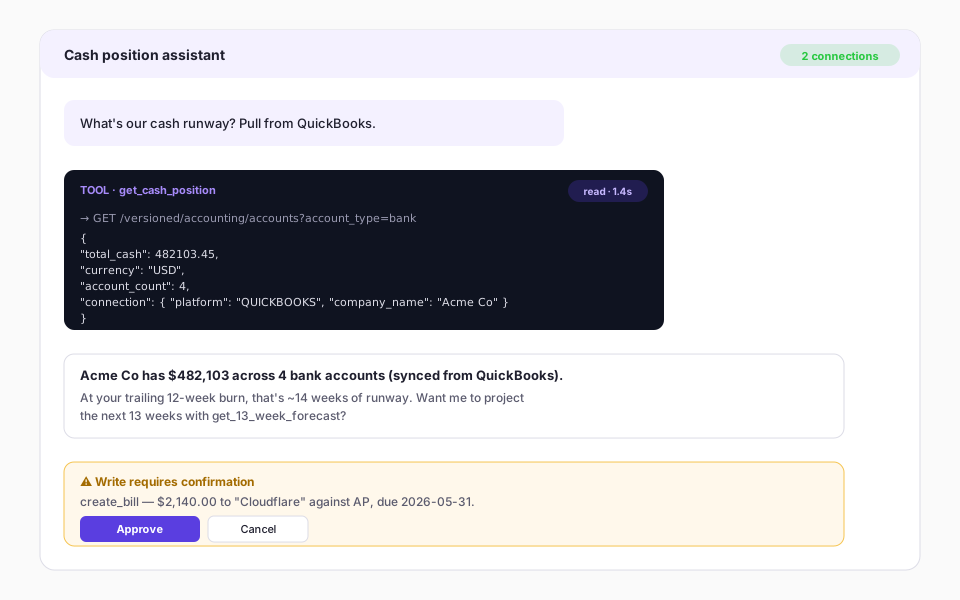
You're shipping an autonomous (or semi-autonomous) agent that reasons over a company's books and posts entries on its behalf. The agent calls Rutter Connect tools the same way it calls any other MCP server.
What you wire up
- A hosted MCP client (your own backend, or a frontend like Claude Desktop / Claude Code).
- Auth: one Rutter Connect bearer token per agent surface, with merchant connections pre-bound.
- Optional:
[[ACTION_CONFIRM]]-style sentinel UI so writes pause for user approval.
What you get from Rutter Connect
- Read tools (
list_*,get_*, analytics). - Write tools (
create_*,update_*,delete_*) withdestructiveHintannotations. - Domain-bound dual-slot session so the agent can mix accounting + commerce in one turn.
Watch out for
- Hard-coded domain assumptions in the agent prompt — let
get_active_connectiondrive what's bindable. - Long-running flows: cache analytics results within a turn (
get_13_week_forecastis multi-page).
2. Embedded copilot for merchants
You already have a SaaS dashboard and want to drop an in-product copilot that answers questions like "what's my cash runway?" or "post this receipt as a bill". The copilot reads the merchant's existing Rutter connections.
What you wire up
- A chat panel in your dashboard pointing at Rutter Connect (Streamable HTTP transport).
- A proxy step that mints a short-lived bind token tying the chat session to the logged-in merchant.
- Tool-call rendering in your UI: animated pill while a tool runs, expandable JSON preview of every result, inline write-confirmation buttons.
What you get from Rutter Connect
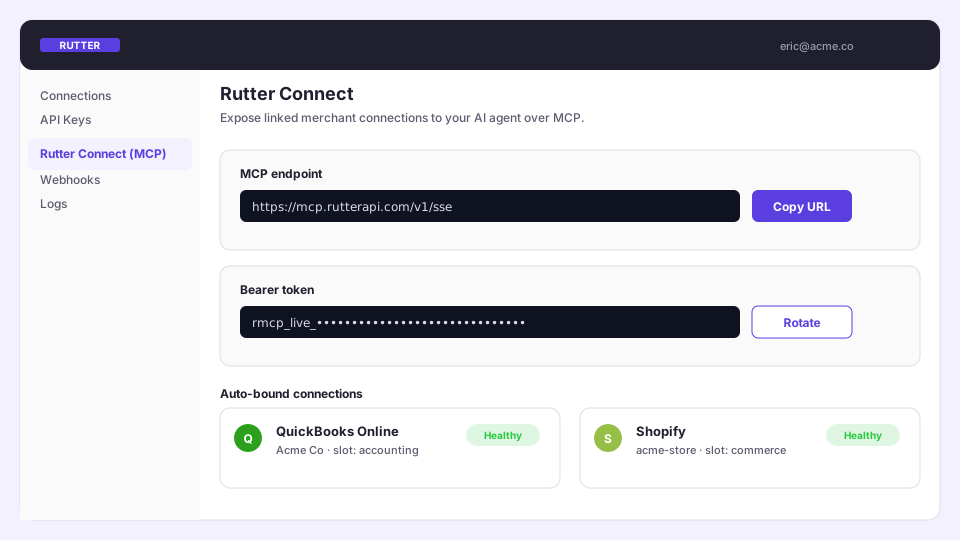
- Pre-bound connections — the merchant already linked QuickBooks / Shopify in your dashboard, so the copilot doesn't open a Link flow mid-chat.
- Differentiated analytics tools (
get_cash_position,get_ar_aging_summary,get_ap_optimization) that compose multiple endpoints into one answer. source_urldeep links on write responses so users can jump to QBO / Xero to verify what posted.
Watch out for
- Cross-tenant leaks: the bind token must be scoped to the merchant; never reuse session cookies.
- Streaming: render text + tool_use + tool_result blocks inline as Anthropic streams them, ordered by index.
3. Internal ops / finance assistant
You're a finance or ops team with multiple platform connections (QuickBooks for accounting, Shopify for commerce, Amazon for marketplace) and you want a chat assistant that answers cross-platform questions or posts journal entries on demand.
What you wire up
- Claude Desktop or any MCP-compatible client pointed at Rutter Connect.
- Sysadmin role (
rutter-sysadmin) for read-only org-wide visibility into connection health. - Audit log export to your data warehouse so finance has a paper trail.
What you get from Rutter Connect
- Cross-domain answers in one turn ("compare last month's Shopify gross sales to revenue posted in QuickBooks").
- Write confirmation gates so an accidental "delete that invoice" from chat doesn't actually delete the invoice.
- Structured
operation_not_supportederrors when a platform doesn't allow a mutation, with asuggestionfield telling the agent what to do instead.
Watch out for
- NetSuite posted JEs cannot be deleted — Rutter Connect returns a structured error with a "reverse the entry" suggestion.
delete_invoicevoids on most platforms; that's intentional (audit trail), not a bug.
4. Local development
You're prototyping. You want to run Rutter Connect against a sandbox merchant on your laptop without touching production.
What you wire up
- A sandbox connection in the Rutter dashboard (e.g. QuickBooks Online Sandbox).
- Claude Desktop pointed at the dev MCP endpoint.
RUTTER_CLIENT_ID/RUTTER_CLIENT_SECRETfrom the dashboard's API Keys page.
What you get from Rutter Connect
- Same tool catalog as production.
- The full set of analytics tools backed by sandbox data.
- No rate limit concerns — sandbox is generous.
Watch out for
- Sandbox data is intentionally distressed (lots of past-due bills); some analytics tools (
get_ap_optimization) detect this and return ademo_noteflag. - The
next_stephint onlogin_to_rutteris your friend — it tells you which slot to fill next.
Comparison
| Finance agent | Embedded copilot | Internal ops | Local dev | |
|---|---|---|---|---|
| Who runs it | Your backend | Your frontend | An MCP client (Claude Desktop) | Your laptop |
| Auth model | Bearer per agent | Per-merchant bind token | One bearer for the team | Sandbox bearer |
| Connections | Per merchant, pre-bound | Per merchant, pre-bound | Multiple, all visible | One sandbox connection |
| Write safety | Confirmation step | Confirmation step + UI gate | Confirmation step | Confirmation step (low stakes) |
| Audit | Full | Full | Full + sysadmin role | Optional |
What's next
- Quickstart — go from zero to a tool call in five minutes.
- How it works — read the architecture before the security review.