Data Sync Cost Recommendations
Every Rutter Object you sync, and every sync you run, translates into API calls against your connected platform's own API. Most platforms enforce rate limits, concurrency limits, or usage quotas on their APIs — and those limits are typically shared across all of your integrations and internal tools, not just Rutter. A broad or frequent Data Sync Configuration can compete with your other platform usage for the same quota, and can increase costs on the underlying platform. It can even prevent syncing altogether if you hit a hard limit.
This guide explains how your Data Sync Configuration choices affect platform API usage, and gives platform-specific recommendations for staying comfortably within limits.
How your configuration affects API usage
Rutter fetches each Rutter Object independently — objects aren't batched together into shared API calls. This means the following levers impact API usage:
- Number of Rutter Objects synced. Each additional object added to your Initial Sync or Incremental Sync is an additional, independent stream of API calls against the platform on every sync interval. Only enable the objects your business actually consumes.
- Initial Sync lookback window. A longer lookback window means more historical pages to fetch for
transactiontype objects (Orders,Bills,Expenses, etc.), which increases the number of API calls made during the Initial Sync. - Incremental Sync frequency. Shorter sync intervals mean more sync runs per day, and therefore more API calls per day. Incremental Sync Frequency is set per platform, not per individual Rutter Object, so a shorter interval multiplies API calls for every object you sync from that platform, not just the one that needs fresher data. This can be useful for keeping your data up to date, but it also increases the chance of hitting platform rate limits, or incurring additional costs. You can adjust this from the dashboard — see Adjusting Incremental Sync Frequency for details. If you are configuring a platform that supports real-time webhooks, using webhooks will keep your data up to date and can reduce costs on the underlying platform substantially.
- Multiple Initial Sync batches. Each batch runs its own fetch pass. Splitting objects across many batches to prioritize certain data doesn't reduce total API calls — it changes when they happen — so batching should be used to control ordering, not as a way to reduce platform load.
Checking your actual usage with Platform Analytics
For platforms with the most impactful rate limits, your Rutter Dashboard's Platform Analytics page shows the real call volume Rutter makes on your behalf, so you don't have to estimate the effect of a Data Sync Configuration change — you can measure it directly, before and after.
For each supported platform, the page shows usage over time and breakdowns by entity, connection and other dimensions, as well as a pricing summary that projects the selected window's usage to a monthly estimate against that platform's billing tiers (e.g. Xero egress tier, QuickBooks partner tier, Sage transaction overage).
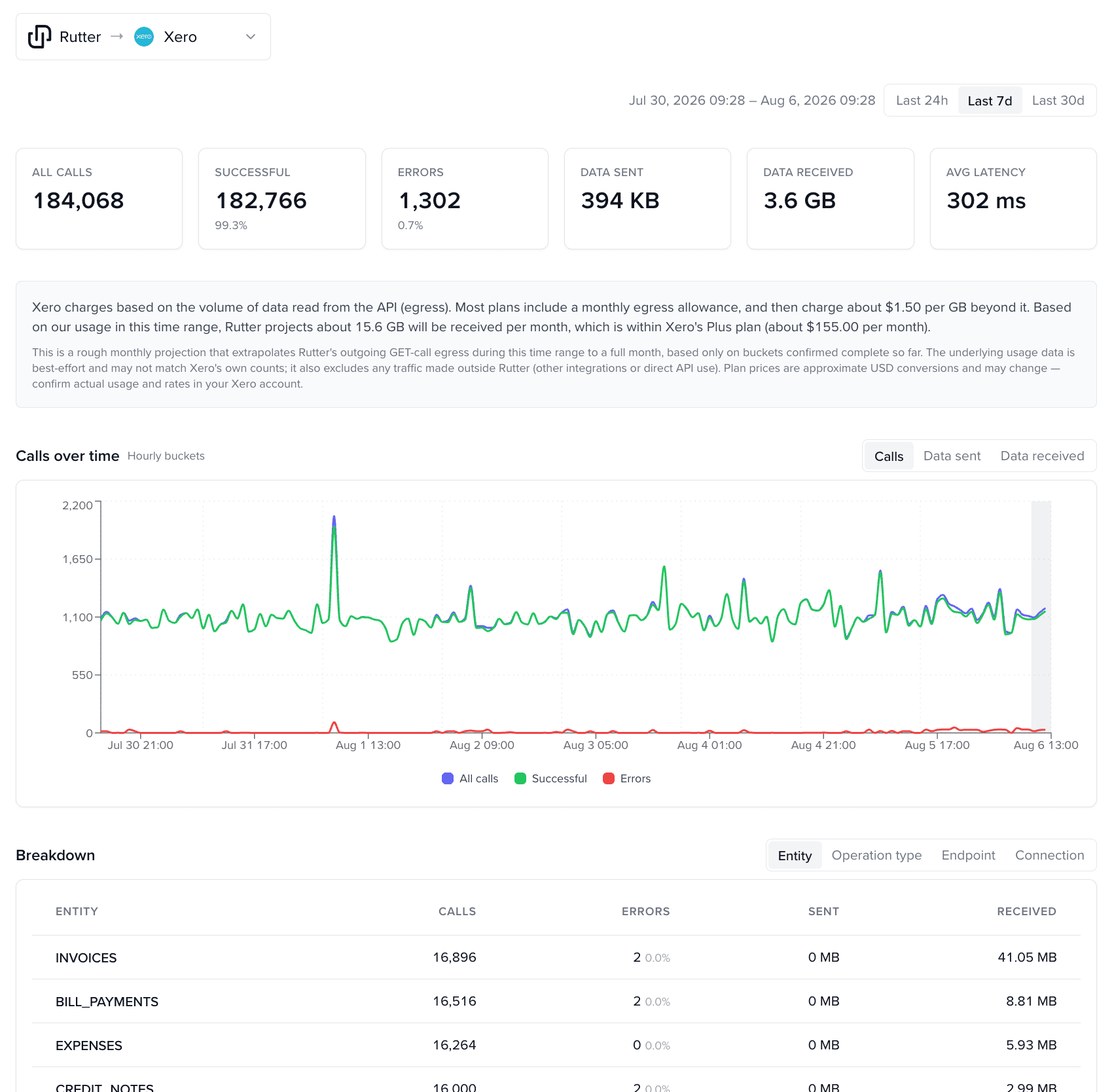
Check this page after any change to your Data Sync Configuration to confirm it had the effect you expected.
The page also has a separate {Org} → Rutter tab showing your own systems' call volume into Rutter's API (not Rutter's calls to your platform), including a peak-calls-per-10-second reading against your account's Rutter rate limit. That's a different limit than the platform-specific ones covered below, but worth knowing about if your own systems poll the Rutter API frequently.
Platform-specific considerations
NetSuite
NetSuite enforces per-account concurrency limits on both its SuiteScript RESTlet and SuiteTalk REST/SuiteQL request pools. These pools are shared across every integration connected to your NetSuite account (Rutter included), so a NetSuite account already running several other integrations has less headroom before hitting SSS_REQUEST_LIMIT_EXCEEDED or similar concurrency errors.
Recommendations:
- Keep your synced Rutter Object list scoped to what you actually query — every additional object is another concurrent stream of RESTlet/SuiteQL calls.
- Be conservative with the Initial Sync lookback window for transaction objects; a shorter historical range noticeably reduces total request volume for the initial backfill.
- If you run other integrations against the same NetSuite account, talk to your Rutter Customer Success Manager before widening your sync scope — we can help right-size concurrency usage against your account's available capacity.
Shopify
Shopify's REST Admin API enforces a leaky-bucket rate limit shared across all apps and integrations accessing your store, including your own storefront and admin traffic. Syncing more Rutter Objects increases how much of that shared bucket Rutter consumes.
Recommendations:
- Only sync the commerce objects your integration needs (
Order,Product,Customer, etc.) — each is an independent, ongoing draw on the same rate-limit bucket. - For high-volume stores, consider a longer Incremental Sync interval for lower-priority objects to leave more of the bucket available for your storefront and other apps.
Xero
Xero enforces multiple limit types on a per-organization basis: a daily call cap, a per-minute cap, an app-wide per-minute cap, and a hard 5-concurrent-request ceiling. All of these are shared across every application connected to that Xero organization. Separately, Xero's developer pricing is tiered by the number of connected organizations and by monthly data egress (the volume of data returned via the API) — a broad or frequent Data Sync Configuration increases both the call volume and the amount of data returned, which can push your Xero developer plan into a higher tier or incur egress overage charges.
Recommendations:
- A wide Rutter Object list combined with a short Incremental Sync interval increases the chance of hitting the daily or per-minute caps, especially if the Xero organization has other connected apps.
- Enable real-time webhooks for objects that support them (e.g.,
Invoice,Payment,Contact) to reduce the need for frequent polling and avoid hitting the per-minute cap. - Check the Xero tab on Platform Analytics for your actual call volume and a projected monthly egress-tier estimate based on your current sync scope.
- Talk to your Rutter Customer Success Manager if that projection is near or over your current Xero developer pricing tier, or if you're planning to scale up your sync scope further.
- If you are a financial service provider — you pull bills or invoices out of Xero for payment on your platform, use Xero Bank Feeds, or use Xero data for underwriting, lending, or credit decisioning — your pricing and connection limits are set through Xero's Financial Services Partnership rather than a self-service tier upgrade. See Xero App Partnership; that review takes months, so start it well before you need the higher limits.
Amazon (Selling Partner API)
Amazon's SP-API rate-limits each operation independently — for example, Orders and report-based endpoints each have their own separate quota, and Amazon stores often have a very large amount of data to backfill. A broad or frequent Data Sync Configuration can easily exceed the quota for one or more operations, especially if the store has a large catalog or many orders.
Recommendations:
- If you need near-real-time order data, set a short Incremental Sync interval only for
Order-type objects rather than for your whole configuration — other object types won't benefit from a shorter interval but will still cost you extra API calls. - Avoid triggering large report-based historical backfills (a long Initial Sync lookback) at the same time as frequent incremental syncs for the same object type.
QuickBooks Online
QuickBooks Online enforces per-company rate limits (requests per minute) and a concurrent-request ceiling, shared across every application connected to that company. Separately, Intuit meters API read operations: reads beyond your plan's included monthly allotment are billed, while write operations are not metered. Since a Data Sync Configuration relies entirely on GET-style reads to populate the Initial Sync and keep the Incremental Sync up to date, a broader or more frequent configuration directly increases the read volume billed against your QuickBooks Online plan.
Recommendations:
- Only sync the Rutter Objects your business actually consumes — every additional object is additional metered read volume every sync interval.
- Prefer a longer Incremental Sync interval where near-real-time data isn't required, since each incremental run adds more metered reads.
- Enable real-time webhooks for QuickBooks Online objects that support them to reduce the number of polling reads needed to keep data current.
- Check the QuickBooks Online tab on Platform Analytics for your actual metered-read volume and a projected monthly partner-tier estimate based on your current sync scope.
- Talk to your Rutter Customer Success Manager if you're unsure how a broader sync scope maps to your Intuit read allotment and pricing tier.
Sage Intacct
Sage Intacct's API gateway enforces a throttle on request volume, returned as a distinct rate-limit error when exceeded. As with the other platforms above, this is a shared account-level throttle. Separately, Sage Intacct meters API usage against a monthly transaction allotment included in your subscription's performance tier — each API call counts as a transaction, and usage beyond your tier's included allotment is billed as overage. A broad or frequent Data Sync Configuration can push your account into overage charges or require a higher performance tier.
Recommendations:
- Scope your Rutter Object list to what you need, and prefer a longer Incremental Sync interval where near-real-time data isn't required, to reduce contention with your other Sage Intacct integrations and stay within your transaction allotment.
- If real-time data is required for certain objects, consider enabling real-time webhooks for those objects to reduce the need for frequent polling and avoid hitting the throttle.
- Check the Sage Intacct V2 tab on Platform Analytics for your actual transaction volume and a projected monthly overage estimate. If you also run a Sage Intacct V1 connection against the same account, its usage isn't reflected there — factor it in separately.
- Check your current performance tier and transaction usage with your Rutter Customer Success Manager before widening your sync scope.
General checklist
- Only sync the Rutter Objects your business actually consumes — remove anything you added "just in case."
- Set the shortest Initial Sync lookback window that satisfies your historical data needs for transaction-type objects.
- Use Incremental Sync Frequency intentionally: only shorten it if you really need near-real-time freshness and real-time webhooks are unavailable.
- If you operate other integrations against the same platform account, factor their usage in before widening your Rutter sync scope.
- Check the Platform Analytics page in your dashboard before and after any configuration change — for Xero, QuickBooks Online, and Sage Intacct V2 it shows your actual call volume and a monthly pricing-tier projection.
- If you're unsure how your configuration will affect your platform's rate limits or API costs, reach out to your Rutter Customer Success Manager before making a broad change.